
Recursive vs Authoritative DNS — What's the difference?
Authoritative DNS servers generally answer DNS queries only for the specific zones they are authoritative for, while a recursive DNS server can answer any DNS query for any zone. Recursive DNS servers use a process called recursion to retrieve answers from authoritative DNS servers.

Authoritative DNS servers
As their name suggests, authoritative DNS servers are authorities for a DNS zone. They store and serve all of the DNS data for the domain, usually to the entire Internet.
The data in a DNS zone consists of DNS records that allow clients to access resources for the domain. This will include A records and AAAA records for websites and servers, MX records to enable email for the domain, and other records. Every DNS zone must also include an SOA record and a set of the NS records.
Every DNS zone is hosted on multiple authoritative DNS servers for redundancy. Usually, four servers are used. Delegations in the parent zone tell the entire Internet how to find the authoritative servers.
Each authoritative DNS server may host a single DNS zone or many. There is no hard limit on the number of zones a single server can host. The authoritative DNS servers for a business might host several zones for different domains owned by the company. Cloud-scale DNS providers such as Amazon's Route 53 or Google's Cloud DNS host thousands of zones per server or more!
Authoritative DNS servers usually don't answer DNS queries from end-user devices such as phones or laptops. That's where recursive DNS servers come in.
Recursive DNS servers
Unlike authoritative DNS servers, recursive DNS servers usually don't host any zones. Recursive DNS servers answer DNS queries from computers and other devices that need to locate resources on the Internet.
DNS queries may be generated by a web browser running on a laptop, an app running on a phone, or a mail server trying to deliver email. When an application needs to look up a name in the DNS, a DNS query is sent to a recursive DNS server.
The recursive DNS server may be automatically configured by the user's Internet Service Provider (ISP), or it may be part of the cellular carrier's infrastructure, or it may be a publicly available DNS resolver that the user has chosen to use.
Recursive DNS servers resolve DNS queries by starting at one of the DNS root servers and following a chain of delegations. The root servers are special authoritative DNS servers that host the root zone. The root zone contains a delegation for every Top Level Domain (TLD).
For each delegation, the recursive DNS server sends the query to another authoritative DNS server. Each query gets it one step closer to the answer. After following around two to four delegations, the recursive DNS server reaches an authoritative DNS server. The authoritative DNS server returns an answer to the query.
The recursive DNS server then caches a copy of the answer and returns it to its client.
Selecting a recursive DNS server
Each time a computer joins a wifi or wired network, one or more recursive DNS servers are set automatically.
The user of the machine, be it a laptop, phone, or server, can change the network settings to specify different recursive DNS servers instead of these default servers. One might use a different resolver for privacy, performance, DNS features, or personal preference.
Some popular recursive DNS servers, also called open DNS resolvers or public recursive DNS servers, and their primary IPv4 DNS addresses:
- Cloudflare - 1.1.1.1: One of the fastest open DNS resolvers available.
- Google - 8.8.8.8: The largest open DNS resolver, handling over a trillion queries per day.
- OpenDNS - 208.67.222.222: Offers a security product suite called "Umbrella" in addition to being an open DNS resolver.
- Quad9 - 9.9.9.9: A global open DNS resolver operated by a Swiss not-for-profit that aims to improve privacy and cybersecurity.
How does recursion work?
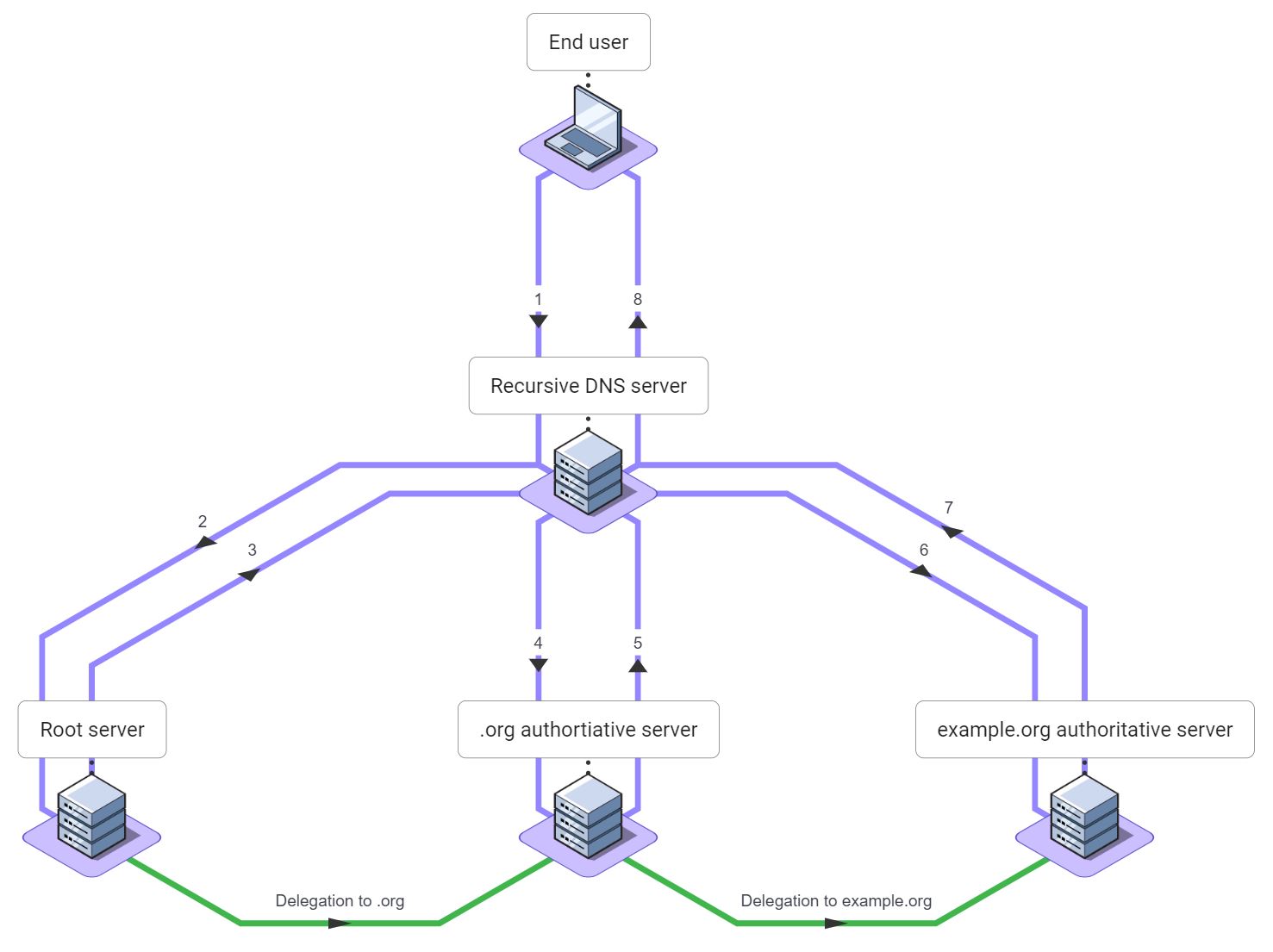
Let's put recursive DNS servers and authoritative DNS servers together and look at how www.example.org would be resolved when a user browses to a website:
- The user's laptop sends a DNS query for
www.example.orgto its recursive DNS server. - The recursive DNS server sends a query for
www.example.orgto one of the Internet root servers. - The root server returns a delegation for
org. - The recursive DNS server sends a query for
www.example.orgto an authoritative server fororg. - The
orgserver returns a delegation forexample.org. - The recursive DNS server sends a query for
www.example.orgto an authoritative server forexample.org. - The
example.orgserver returns the answer: address records forwww.example.org. - The recursive DNS server sends the answer back to the user's laptop.
Caching in the DNS
In the example above, the recursive DNS server had to send the user's query three times. Each query takes from 10 to 100 milliseconds or more to complete. The recursive DNS server must process each response. This is a lot of work!
The DNS was designed from the beginning to reduce the work and time required for recursion through caching. Caching is the process of saving a copy of a piece of data for a period of time to make subsequent lookups faster.
Caching is so critical to the DNS that every record in the entire DNS contains a Time-to-Live (TTL) value in seconds. The TTL of each record specifies how long that record may be cached.
The recursive DNS server caches the result of each query. If a second end user were to query for www.example.org within the answer's TTL, then the recursive DNS server would return the cached answer. It would not send any DNS queries to the authoritative servers. Caching serves three very important purposes in the DNS:
- It reduces DNS query latency.
- It reduces the number of queries each recursive DNS server has to send, reducing the workload on recursive DNS servers.
- It also reduces the load on each of the authoritative servers.
The DNS client, in this example the user's laptop, will also cache DNS results. Client caching further reduces load on recursive and authoritative DNS servers.
Iterative or recursive?
Recursive DNS servers are sometimes called iterative DNS servers.
This is because of the type of DNS queries that recursive DNS server send. Recursive DNS servers do not set the Recursion Desired or RD bit in their queries. This bit is specified in RFC 1034.
By not setting this bit, recursive DNS servers request that recursion not be performed on their behalf. Partly, this allows recursive DNS servers to cache DNS data more effectively.
Queries that do not have the RD bit set are called iterative queries. And so, recursive DNS servers are sometimes called iterative DNS servers.
Related questions
Can a DNS server be authoritative and recursive at the same time?
Yes, but this is uncommon and not recomended.
Most DNS server software can operate in either authoritative or recursive mode. Usually these modes are not exclusive. In earlier times, DNS servers would often serve both roles. They would answer queries authoritatively if they hosted the appropriate zone and perform recursion for other queries.
This is rare today. The primary problem is that authoritative DNS is critical and recursive DNS is expensive. An attacker might find a way to increase load on a DNS server using expensive recursive queries to such a degree it can no longer answer authoritative queries.
Will recursive servers always return the same data as authoritative servers?
Often, yes. But sometimes not due to caching or filtering.
Some public recursive DNS servers offer features such as child-safe browsing, malware protection, spam blocking, and ad blocking. These features may cause them to purposefully return a DNS error instead of a valid DNS result. In this case, the authoritative DNS server for the zone would return an address or other DNS data, but some recursive DNS servers might return errors to protect their users.
Caching can also result in differences between recursive and authoritative DNS server results. When DNS data is changed on the authoritative DNS servers there will be a period of time, up to the record's TTL in seconds, where end users may see either the old or the new DNS records. This is considered an acceptable trade-off given the considerable benefits that DNS caching provides.
DNS administrators who wish to change records and minimize impact often temporarily shorten the TTL a few days before making the change. Or they may ensure that end users will not be impacted during the period where both old and new records may be used.
How can I tell if a DNS server is authoritative or recursive?
By checking if the server returns the AA bit in DNS responses.
DNS responses contain a special bit called Authoritative Answer or AA bit. This bit is specified in RFC 1034. An authoritative DNS server will set the AA bit in responses. The AA bit indicates that it is an authoritative server. A recursive DNS server will not set this bit in responses.
You can see this bit using dig and other tools. In the dig output line that starts with "flags:" if you see the string "aa" then the AA bit is set and the response is from an authoritative DNS server. Here is a response from one of Google's authoritative DNS servers:
dig google.com A @ns1.google.com.

; <<>> DiG 9.10.3 <<>> google.com A @ns1.google.com.
;; global options: +cmd
;; Got answer:
;; ->>HEADER<<- opcode: QUERY, status: NOERROR, id: 14203
;; flags: qr aa rd; QUERY: 1, ANSWER: 1, AUTHORITY: 0, ADDITIONAL: 1
;; WARNING: recursion requested but not available

;; QUESTION SECTION:
;google.com.                    IN      A

;; ANSWER SECTION:
google.com.             300     IN      A       142.250.217.110
Querying Google's public DNS resolver, which is not authoritative for the google.com zone, the string "aa" is not present next to "flags". So this response is not authoritative. The absence of the AA bit indicates that this is a recursive DNS server:
dig google.com A @8.8.8.8

; <<>> DiG 9.10.3 <<>> google.com A @8.8.8.8
;; global options: +cmd
;; Got answer:
;; ->>HEADER<<- opcode: QUERY, status: NOERROR, id: 43950
;; flags: qr rd ra; QUERY: 1, ANSWER: 1, AUTHORITY: 0, ADDITIONAL: 1

;; QUESTION SECTION:
;google.com.                    IN      A

;; ANSWER SECTION:
google.com.             133     IN      A       142.250.217.110
There are other differences in these responses that also show authoritative versus recursive. The TTLs are different: the TTL will count down in a response that came from the cache of a recursive DNS server, but the TTL from the authoritative DNS server will always be the full TTL value. The authoritative server also indicated that it does not support recursion, so dig printed WARNING: recursion requested but not available.